So today we discuss about the link button and image adding on a web page Link Button Links are found in nearly all web pages. Links allow users to click their way from page to page. HTML links are hyperlinks. A hyperlink is a text or an image you can click on, and jump to another document. HTML Links - The target Attribute: _blank: Opens the linked document in a new window or tab. _self: Opens the linked document in the same frame as it was clicked (this is default). _parent: Opens the linked document in the parent frame. _top: Opens the linked document in the full body of the window. framename: Opens the linked document in a named frame. HTML Link: 2.1 Coding: 2.2 Output: Image As A Link: 2.1 Coding: 2.2 Output: Image Addition on a webpage: 3.1 Coding: 3.2 Output: Summary: Use the HTML a element to define a link. Use the HTML href attribute to define the link address....
" I teach you the most interesting web language which is the HTML " But before starting i told you about html 4.01 HTML mean HyperText Markup Language . HTML is the standard markup language used to create web pages.It is written in the form of HTML elements consisting of tags enclosed in angle brackets . HTML tags most commonly come in pairs like 'h1' and 'h1' although some represent empty elements and so are unpaired, for example 'img'. The first tag in such a pair is the start tag, and the second is the end tag (they are also called opening tags and closing tags). Web browsers can read HTML files and render them into visible or audible web pages. Browsers do not display the HTML tags and scripts, but use them to interpret the content of the page. HTML describes the structure of a website semantically along with cues for presentation, making it a markup language, rather than a programming language. HTML elements ...
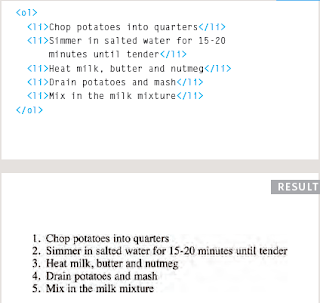
3|Lists Ordered Lists <ol> The ordered list is created with the <ol> element. <li> Each item in the list is placed between an opening <li> tag and a closing </li> tag. (The li stands for list item.) Browsers indent lists by default. Sometimes you may see a type attribute used with the <ol> element to specify the type of numbering




Comments
Post a Comment